
Download Ubiquiti LAN Scanner – LAN Scanner, Ubiquiti Devices, Network Tools
Overview
The Ubiquiti LAN Scanner is a dedicated desktop application designed to simplify the discovery and management of UniFi devices within local area networks. Its primary purpose is to identify connected Ubiquiti network equipment—such as access points, switches, and gateways—through automated scanning. This tool is especially useful for network administrators, IT professionals, and home users managing UniFi-based infrastructures. By detecting devices on the network, the software enables quick access to critical management functions, streamlining device troubleshooting and maintenance.
Users can leverage this application to locate missing or unresponsive devices, verify network topology, and initiate remote actions such as rebooting, restoring default settings, or sending an “inform” command to trigger re-registration. These capabilities are essential for maintaining network stability and performance. The tool is particularly effective in environments where multiple UniFi devices are deployed across different subnets or physical locations.
The developer did not provide additional background information. Platform compatibility is confirmed for Windows and Mac, with a lightweight footprint of 12.5 MB. The application is designed for use in controlled, local network environments and does not require external connectivity for core functionality. It is intended for users familiar with UniFi ecosystem operations and network device management.
Key Features & Capabilities
- LAN Device Discovery: Automatically scans the local network to detect all active Ubiquiti devices, including UniFi Access Points, Switches, Gateways, and Cameras.
- Remote Management Commands: Enables users to send standard action commands such as Reboot, Restore to Default, Locate (LED blinking), and Set Inform directly from the interface.
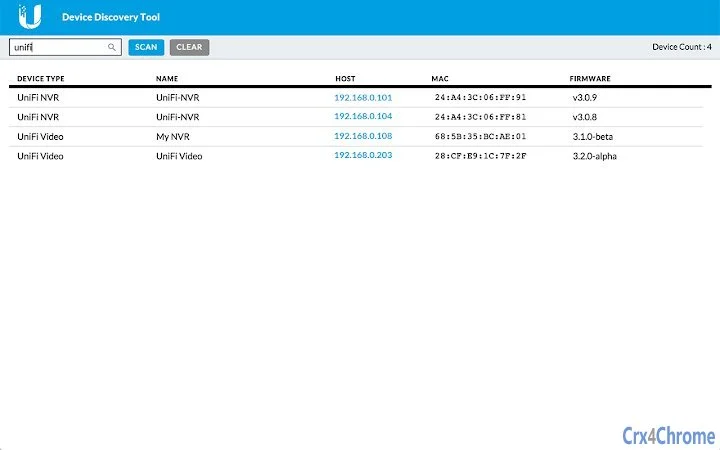
- Real-Time Device Status: Displays up-to-date information on device status, IP address, MAC address, and firmware version when available.
- Simple and Fast Interface: Designed with minimal complexity, allowing users to initiate scans and execute commands with just a few clicks.
- Offline Operation: Functions without requiring an internet connection, ensuring usability in isolated or secure network environments.
For example, an IT technician can use the tool to locate a misplaced UniFi Access Point by triggering the “Locate” command, causing the device to flash its LED indicator. Similarly, a network administrator managing a multi-site deployment can quickly verify device presence across subnets and initiate a reboot to resolve connectivity issues. The application supports batch actions where applicable, improving workflow efficiency during large-scale network maintenance.
User Interface, Workflow & Performance
The user interface is streamlined and focused on core functionality, featuring a clean layout with a central scan button, a device list panel, and a command execution toolbar. Navigation is intuitive, with minimal menu depth, allowing users to start a scan and manage devices without extensive training. The workflow follows a logical sequence: initiate scan → view detected devices → select target → choose action → confirm execution.
Performance observations are based on general software behavior patterns. The application operates efficiently within local network constraints, with scan times dependent on network size and device responsiveness. The developer did not specify resource usage details, but the 12.5 MB installation size suggests low system impact. Stability appears consistent with typical desktop utilities, though real-world usage patterns were not documented. The tool does not appear to rely heavily on CPU or RAM during operation, which is typical for lightweight network utilities.
Compatibility & System Requirements
Ubiquiti LAN Scanner is compatible with Windows and Mac operating systems. The software version is 1.0.0, with an installation size of 12.5 MB. The developer did not specify exact system requirements, including minimum CPU, RAM, or disk space. It is presumed to function on modern systems with standard network adapters and IPv4 support. No additional dependencies or third-party libraries were noted in the release package.
Compatibility information was partially provided. The application does not require administrator privileges for basic scanning, though certain commands like reboot or restore may require elevated permissions depending on the host system. Network-level access is required to communicate with target devices, which must be reachable via the local subnet. The tool does not support mobile platforms or cloud-based management integration.
Pros and Cons
Pros
- Lightweight and fast, with a small footprint of 12.5 MB
- Direct control over UniFi devices via simple commands
- Effective for troubleshooting and device location
- Runs offline, ideal for secure or isolated networks
- Intuitive interface suitable for both beginners and experienced users
Cons
- No support for mobile operating systems
- Limited to local network operations; no cloud integration
- Exact system requirements not publicly listed
- Does not support advanced network monitoring features
- Only works with Ubiquiti UniFi devices, not other brands
FAQ Section
Is the Ubiquiti LAN Scanner compatible with Windows and Mac?
Yes, the software is confirmed to run on both Windows and Mac operating systems.
Does the tool require an internet connection to function?
No, the application operates offline and does not need internet access to scan or manage devices on the local network.
Can I use this tool to manage non-Ubiquiti devices?
No, the tool is specifically designed for Ubiquiti UniFi devices and does not support other brands or network equipment.
Is the software free to download and use?
Yes, the application is available at no cost. It is distributed as free software with no hidden fees.
How often can I update the software?
Updates are released by the developer as needed. Users should check the official source for the latest version and release notes.
Final Thoughts + CTA
The Ubiquiti LAN Scanner delivers a focused, efficient solution for discovering and managing UniFi devices on a local network. Its simplicity, speed, and direct command execution make it a valuable tool for IT professionals and advanced home users managing Ubiquiti-based networks. While it lacks cloud integration and mobile support, its offline capabilities and lightweight design ensure reliable performance in diverse environments.
For those working with UniFi hardware, this tool fills a practical gap in network management workflows. It reduces troubleshooting time and enhances device visibility without requiring complex setups or additional software. The free availability further increases its appeal.
Download Ubiquiti LAN Scanner now







